College Campus Access Control: How Universities Manage Student Credentials and Campus Security
29th Oct 2026
College Campus Access Control: How Universities Manage Student Credentials and Campus Security
It's 2 a.m. at a university residence hall. A student approaches the entrance, taps an ID card against the reader, and the door unlocks.
The entire process takes less than a second. Yet behind that simple interaction is a security system responsible for protecting students, controlling building access, and managing thousands of credentials throughout the academic year.
Now imagine that same student loses the card, moves to another residence hall, or graduates. Who removes the old access permissions? How quickly can a replacement card be issued? And what prevents an unauthorized person from using a lost credential?
College campus access control addresses these challenges by combining electronic credentials, door readers, access permissions, and centralized management systems.
For university security departments, housing administrators, and campus card offices, choosing the right credential technology is only part of the solution. Equally important is having a reliable process for issuing, updating, replacing, and deactivating student credentials.
This guide explains how university access control works, compares student ID card technologies, and outlines practical strategies for securing residence halls, classrooms, laboratories, and other campus facilities.

What Is College Campus Access Control?
College campus access control is a security system that determines which students, faculty, employees, contractors, and visitors can enter specific campus buildings or restricted areas.
Instead of relying exclusively on traditional keys, universities use electronic credentials such as proximity cards, smart cards, key fobs, and mobile student IDs.
When someone presents a compatible credential to a door reader, the access control system checks the credential's authorization. If the individual has permission to enter that location at that time, the system unlocks the door.
Depending on the system, access control can also provide:
- Centralized management of student and employee permissions.
- Electronic records of authorized and denied access attempts.
- Immediate deactivation of lost or stolen credentials.
- Scheduled access for classrooms, laboratories, and administrative buildings.
- Integration with campus identification and housing systems.
- Alerts for certain security events, including forced or propped-open doors.
Unlike traditional keys, properly configured electronic credentials can be disabled without replacing locks or collecting physical keys.
This flexibility is particularly valuable at colleges and universities, where enrollment, housing assignments, employment, and building access requirements change throughout the year.
Types of Student ID Cards and Campus Access Credentials
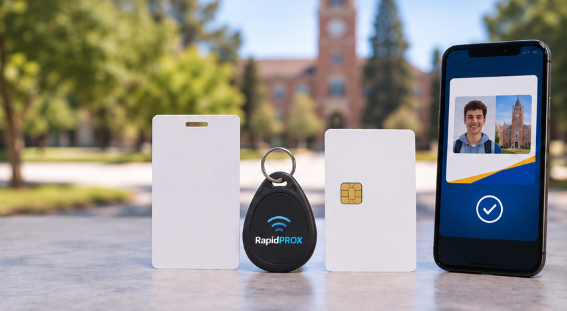
Not all student ID cards use the same technology. Understanding the differences is important when selecting new credentials, replacing existing cards, or upgrading a university access control system.
|
Credential Type |
Technology |
Security Considerations |
Common Campus Applications |
|
Magnetic stripe cards |
Contact-based magnetic stripe |
Easily copied; susceptible to physical wear |
Legacy identification and payment systems |
|
Proximity cards |
Typically 125 kHz RFID |
Most traditional formats lack cryptographic authentication |
Existing campus access systems, general building entry |
|
Smart cards |
Typically 13.56 MHz contactless technology |
Can support strong authentication and encryption, depending on product and configuration |
Residence halls, laboratories, restricted areas |
|
Mobile credentials |
NFC, BLE, or supported wallet technology |
Security depends on platform, credential implementation, and reader compatibility |
Mobile-enabled campus buildings and services |
125 kHz Proximity Cards: Affordable and Widely Supported
Traditional 125 kHz proximity cards remain common in established access control systems.
These credentials communicate wirelessly with compatible readers and are available in several formats, including printable ISO cards, clamshell cards, key fobs, and adhesive tags.
Their primary advantages include affordability, durability, and compatibility with many existing installations.
For campuses that already operate compatible proximity readers, replacing cards may be more economical than replacing an entire access control system.
However, traditional proximity credentials generally transmit an identifier without cryptographic authentication. This makes many legacy formats vulnerable to copying.
Universities should evaluate these limitations against the security requirements of each building.
For more information, see What Are Proximity Cards?.
Smart Cards: Enhanced Security for Restricted Areas
Contactless smart cards operate at 13.56 MHz and can support more advanced security features than traditional proximity credentials.
Depending on the technology and configuration, these may include encrypted communication, cryptographic authentication, and multiple applications on a single card.
Examples include MIFARE DESFire, HID iCLASS, and HID Seos credentials. However, these are not interchangeable technologies, and not all versions or configurations provide the same level of security.
Modern implementations can be particularly useful for:
- Residence halls and student housing.
- Research laboratories.
- Medical and health sciences buildings.
- Restricted administrative offices.
- Equipment rooms and other sensitive facilities.
Important: Universities should verify both the credential technology and the reader's supported applications before purchasing replacement smart cards.
A card operating at 13.56 MHz is not automatically compatible with every 13.56 MHz reader.
Mobile Student IDs: Convenience With Important Considerations
Mobile credentials allow eligible students to use compatible smartphones or wearable devices instead of traditional plastic cards.
Depending on the access control platform, mobile IDs can use NFC, Bluetooth Low Energy, or other supported technologies.
Some universities also integrate mobile credentials with campus services such as dining, payments, and identification.
Mobile access offers convenience and can simplify certain credential management tasks. However, universities must consider device compatibility, enrollment procedures, battery limitations, and accommodations for students who cannot or choose not to use mobile devices.
Physical ID cards therefore remain an important part of many campus credential programs.
How Universities Manage Student Credentials From Enrollment to Graduation
Successful university access control requires more than compatible cards and readers.
Every credential should follow a clearly defined lifecycle, beginning when a student enrolls and ending when access privileges are no longer authorized.
1. Issue Student ID Cards During Enrollment
During orientation and the beginning of each semester, campus card offices may need to issue hundreds or thousands of new credentials.
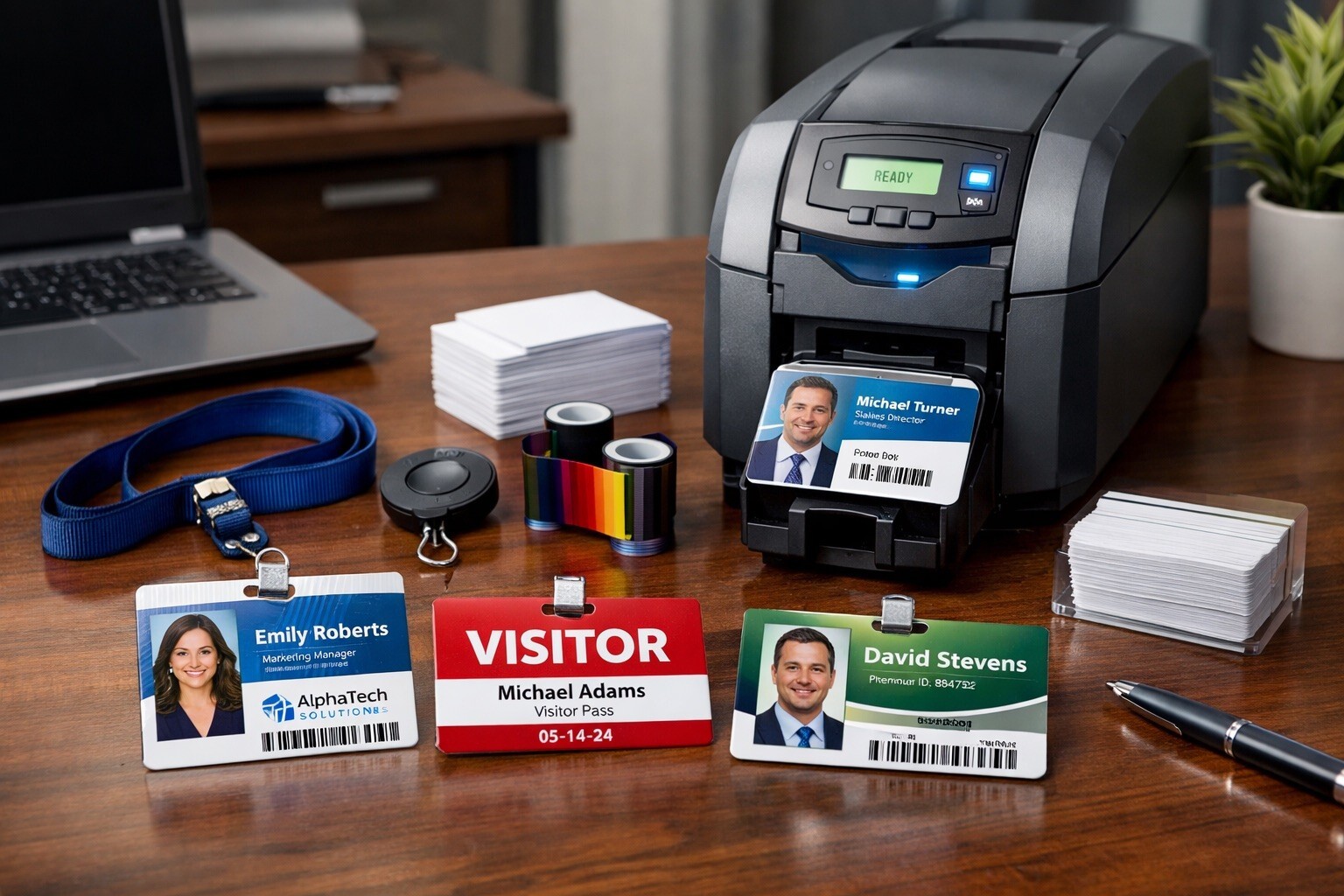
A typical process includes verifying the student's identity, capturing a photograph, printing the student ID card, encoding the appropriate technology, and activating the credential in the campus access control system.
A dependable ID card printer and an adequate supply of blank credentials, ribbons, and accessories can help reduce delays during peak enrollment periods.
Universities should also maintain sufficient replacement inventory for damaged and lost cards throughout the academic year.
2. Assign Access Permissions by Role and Location
Students should receive access only to buildings and areas appropriate for their enrollment, housing assignments, and academic responsibilities.
For example, a student living in Residence Hall A may need access to that building, common areas, and designated campus facilities.
That credential should not automatically provide access to Residence Hall B, an equipment storage room, or a restricted research laboratory.
Most modern access control systems allow administrators to establish access groups based on housing assignments, academic programs, employment roles, and authorized schedules.
This approach supports the principle of least privilege: providing only the access required for an individual's responsibilities.
3. Update Student Access When Circumstances Change
Campus permissions rarely remain static for an entire academic year.
Students change residence halls, join research programs, become resident assistants, or accept campus employment.
Access permissions should be updated promptly whenever these changes occur.
Where supported, integration between housing management, student information, and access control systems can reduce manual administrative work.
4. Replace Lost or Damaged Credentials Promptly
Lost student ID cards create both inconvenience and potential security exposure.
Universities should establish a straightforward process that allows students to report missing credentials, deactivate them, and obtain replacements quickly.
The replacement should use a unique credential identifier, and the missing credential should remain disabled unless a defined recovery process authorizes reactivation.
Campus card offices should also maintain emergency replacement procedures for evenings, weekends, and holidays.
5. Deactivate Credentials When Access Is No Longer Required
Graduation, withdrawal, housing termination, and employment changes should trigger reviews of access permissions.
Where appropriate, automated expiration rules can prevent old credentials from remaining active indefinitely.
Regular reconciliation between student records and active access credentials can help identify authorization errors before they become security problems.
Securing Residence Halls and Student Housing
Residence hall access control presents unique challenges because students live in these buildings, receive visitors, and frequently enter at all hours.
Security measures must protect residents while supporting normal university operations and emergency procedures.
A properly designed residence hall access program should address several important areas.
Control Exterior Building Entrances
Exterior residence hall doors should use access control measures appropriate to the building's security requirements.
For many universities, this includes electronic readers, authorized student credentials, door-position monitoring, and centrally managed permissions.
Higher-risk entrances may justify stronger credential authentication, additional monitoring, or other protective measures.
Prevent Tailgating and Unauthorized Entry
Even a well-designed electronic access system cannot automatically prevent every unauthorized entry.
Tailgating occurs when someone follows an authorized individual through a controlled entrance without presenting a credential.
Universities can reduce this risk through student awareness programs, appropriately designed entrances, visitor procedures, and monitored access points.
Students should know how to direct visitors to the proper check-in location rather than allowing unknown individuals into secured residence halls.
Establish Clear Visitor Access Procedures
Visitor access should follow documented campus housing policies.
Depending on the institution, visitor management may include registration, identification verification, temporary credentials, escort requirements, and time-limited access.
Distinctive visitor badges can help staff and residents identify individuals who require an escort or additional authorization.
Monitor Door Alarms and Security Events
Door-held-open alarms, forced-door alerts, and access-event records can help security personnel identify potential problems.
However, these tools are only useful when alerts are appropriately routed, investigated, and resolved.
Universities should establish clear responsibilities for responding to security events and reviewing incidents.
University Access Control: Choosing the Right Credentials
Selecting replacement or new campus access cards requires more than choosing between proximity and smart card technology.
Universities should consider existing hardware, credential programming, card durability, operational needs, and future expansion plans.
Verify Compatibility With Existing Readers
Before placing an order, determine the exact credential technology supported by the campus readers.
For traditional proximity systems, important details may include:
- Credential manufacturer and technology.
- Bit format, such as a supported 26-bit or other format.
- Facility or site code.
- Existing card-number range.
- Reader compatibility and access control system requirements.
Smart card applications may require additional configuration details, secure provisioning, or authorized encoding arrangements.
Two credentials that look identical can contain completely different technologies.
Working with an experienced credential supplier can help prevent costly compatibility mistakes.
Consider Dual-Technology Cards During Upgrades
Some universities maintain older proximity readers while gradually upgrading buildings to newer smart card technology.
In these situations, compatible dual-technology cards may help support a phased transition.
A properly selected combination credential can incorporate both legacy and newer technologies, allowing the university to update readers building by building.
This approach may reduce operational disruption, although the actual benefits depend on the campus system and credential configuration.
Evaluate Card Durability and Printing Requirements
Student ID cards experience significant daily wear.
They are carried in wallets, attached to lanyards, inserted into badge holders, and presented to readers repeatedly.
For cards that require photos and printed identification, universities should choose materials compatible with their printing equipment and expected usage conditions.
Durable card construction and appropriate badge accessories can help reduce premature replacement.
Plan for Seasonal Demand and Emergency Replacements
Unlike many businesses, universities experience substantial fluctuations in credential demand.
Orientation, move-in periods, summer programs, and major campus events can create sudden increases in card requirements.
A reliable supplier should be able to support both planned bulk purchases and smaller replacement orders.
This is especially important when damaged or missing credentials must be replaced without interrupting authorized campus access.
Campus Access Control Checklist for University Security Teams
Use this checklist to evaluate your existing student credential and building access procedures.
- ✔ Document which credential technologies and readers are installed across campus.
- ✔ Verify access permissions for residence halls, laboratories, and restricted buildings.
- ✔ Confirm lost or stolen credentials can be deactivated promptly.
- ✔ Establish a reliable process for replacing damaged and missing student ID cards.
- ✔ Review student access permissions after housing or enrollment changes.
- ✔ Confirm that temporary visitor credentials expire appropriately.
- ✔ Test door-held-open and forced-door alarms where installed.
- ✔ Review access logs according to documented security and privacy policies.
- ✔ Maintain enough cards, printing supplies, and accessories for peak demand.
- ✔ Develop a phased upgrade strategy for legacy or vulnerable technologies.
Campus security reviews should involve the appropriate stakeholders, including public safety, housing, facilities, IT, and the campus card office.
College Campus Access Control Compliance: Clery Act and FERPA
Universities must consider applicable federal requirements and institutional privacy policies when developing campus security procedures.
The Clery Act and Campus Security
The Jeanne Clery Disclosure of Campus Security Policy and Campus Crime Statistics Act requires covered institutions to disclose campus security policies and specified crime statistics.
Among its requirements is an annual security report, generally due October 1, that addresses campus safety policies, crime reporting, and other required information.
Electronic access systems may support campus investigations and security procedures, but the Clery Act does not prescribe a specific proximity card, smart card, or reader technology.
FERPA and Student Information
The Family Educational Rights and Privacy Act (FERPA) protects qualifying student education records and regulates their disclosure.
According to the U.S. Department of Education, a student ID number displayed on a card may qualify as directory information under specified conditions, including that the number alone cannot provide access to education records without an additional authentication factor.
Universities should evaluate whether particular campus credential records qualify as education records and apply appropriate privacy controls.
Practical measures include restricting administrative access, securing system integrations, establishing retention policies, and limiting the use or disclosure of sensitive student information.
Frequently Asked Questions About College Campus Access Control
How do college student ID cards open doors?
Student ID cards contain credential technology compatible with the campus reader. When a card is presented, the system processes its credential information, verifies applicable authorization, and grants or denies access. The authentication method varies by technology.
Are proximity cards secure enough for college dorms?
Traditional 125 kHz proximity cards can support established access control operations, but many use unencrypted identifiers that may be copied. For new installations or higher-security applications, universities should consider appropriately configured cryptographic smart card systems.
Can universities use existing proximity cards with new readers?
Sometimes. Certain readers support multiple technologies, and dual-technology cards can help bridge older and newer systems. Compatibility must be verified before purchasing or deploying replacements.
What happens when a student loses an access card?
The university should promptly deactivate the missing credential and issue an authorized replacement with a new unique identifier. Any associated access permissions should be transferred through the institution's established procedures.
Can students use smartphones instead of physical ID cards?
Yes, when the university's access control infrastructure supports compatible mobile credentials. Device eligibility, credential provisioning, battery limitations, and institutional policies vary by platform.
How often should universities review student access permissions?
Access permissions should be reviewed whenever relevant changes occur, including housing reassignment, withdrawal, graduation, or employment termination. A broader review each academic term is a useful operational starting point, with more frequent reviews for sensitive areas.
What information is needed to order replacement campus proximity cards?
For many traditional proximity systems, suppliers need the credential technology, bit format, facility code, and required card-number range. Providing an existing part number or previous purchase information can help identify compatible replacements.
Reliable Campus Access Credentials From ID Enhancements
Managing student credentials across an entire university requires dependable products, consistent programming, and a supplier that understands access control compatibility.
ID Enhancements has served the identification and access control industry since 1993, providing universities, businesses, government agencies, and other organizations with access credentials, ID card printers, supplies, and security solutions.
Our product offerings include:
- Proximity cards and key fobs: Compatible options for a wide range of established 125 kHz access control systems.
- Smart cards: Supported MIFARE, DESFire, iCLASS, and Seos technologies for applications requiring compatible advanced credentials.
- Printable ID cards and badging supplies: Products for campus identification programs and student card offices.
- ID card printers: Equipment and supplies from established brands including Zebra, Fargo, and Magicard.
- Custom credential programming: Supported bit formats, facility codes, and card-number sequences to meet compatible system requirements.
RapidPROX®: Fast, Dependable Credentials for Campus Access
For universities maintaining compatible proximity-based systems, RapidPROX® offers an economical alternative to many OEM proximity credentials.
RapidPROX® credentials are manufactured in the USA and backed by a Lifetime Warranty against manufacturing defects.
Most custom-programmed orders have an approximately 48-hour production turnaround, with same-day production available on qualifying orders.
Whether your university needs replacement credentials for a single residence hall or a larger supply of student access cards for the upcoming semester, ID Enhancements can help identify options that meet your technology and programming requirements.
Preparing for orientation, replacing campus credentials, or planning a security upgrade?
Contact ID Enhancements at 1-800-279-4560 or visit www.id-enhancements.com to discuss your campus access credential requirements.