

Description
Zebra ZC300 Dual-Sided ID Card Printer Bundle | ZC32-000CQ00US00
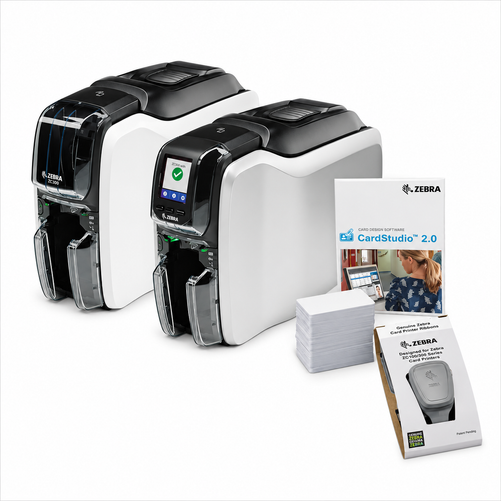
Design, photograph, and print professional two-sided photo ID badges in-house with the Zebra ZC300 QuikCard ID Solution. This desktop badging bundle pairs the ZC300 dual-sided card printer with CardStudio 2.0 Standard software, a webcam, 200 blank PVC cards, and a YMCKOK color ribbon. It gives your team the equipment and starter supplies to issue employee badges, student IDs, visitor passes, and membership cards.
What’s Included
- Zebra ZC300 dual-sided ID card printer with USB and Ethernet connectivity, a U.S. power cord, and a Windows printer driver
- Zebra CardStudio 2.0 Standard software for designing and printing ID cards
- Webcam for capturing ID photos at the issuance station
- 200 blank PVC cards for your initial print runs
- YMCKOK ribbon rated for 200 prints, with full color and a clear overlay on the front and black printing on the back
Key Printer Features
- Automatic dual-sided printing. Print the front and back in a single job without manually flipping cards.
- 300 dpi direct-to-card printing. Produce photo IDs with crisp text and edge-to-edge printing on standard CR80 cards (3.375 × 2.125 inches).
- Up to 140 dual-sided cards per hour when batch printing with a YMCKOK ribbon over USB. Actual throughput varies by setup.
- 100-card input and output hoppers. Run batches or use the manual feed slot for one-off badges and replacements.
- Full-color LCD and front-facing controls. Check printer status and access cards from the front at a reception desk or badging station.
Put Both Sides of the Badge to Work
Keep the photo, name, and organization logo prominent on the front. Use the back for a barcode, return instructions, a help desk number, or visitor policies. The included YMCKOK ribbon is designed for layouts that use full color on the front and black text or graphics on the back.
Ideal for Ongoing Badge Issuance
Use the ZC300 bundle at HR desks, school offices, healthcare facilities, and reception areas that issue new badges and replacements throughout the year. Connect by USB for a dedicated workstation or use built-in Ethernet to place the printer on your local network.
Product images are for illustration purposes. The appearance of the actual product and included components may vary.