Description
Magicard MD100YMCKO/2 YMCKO Color Ribbon for Pronto100 – 100 Prints
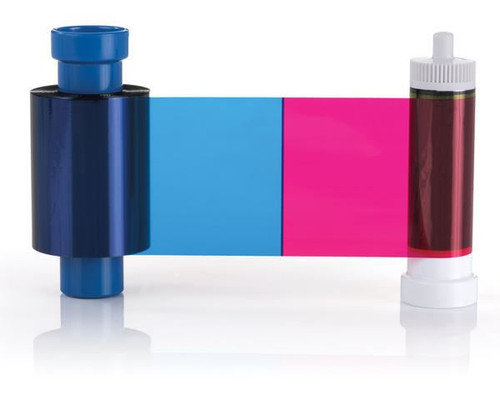
The Magicard MD100YMCKO/2 color ribbon is the genuine YMCKO printer ribbon for the Magicard Pronto100 ID card printer. Designed for professional single-sided ID card production, this ribbon combines Yellow, Magenta and Cyan color panels with a resin Black panel and clear Overlay panel to produce full-color photo IDs with sharp black text, barcodes and other fine details.
Each MD100YMCKO/2 ribbon produces up to 100 single-sided full-color cards, making it ideal for employee badges, student IDs, membership cards, visitor credentials, access control badges and other personalized identification cards printed with the Magicard Pronto100.
Key Features
- Magicard part number MD100YMCKO/2
- Genuine YMCKO full-color ribbon
- Designed specifically for the Magicard Pronto100
- Produces up to 100 single-sided color prints
- Yellow, Magenta and Cyan dye-sublimation panels
- Resin Black panel for sharp text, barcodes and fine details
- Clear Overlay panel protects the printed card surface
- Designed for professional photo ID and credential printing
- Not intended for other Magicard printer models
Ribbon Specifications
| Manufacturer | Magicard |
| Part Number | MD100YMCKO/2 |
| Ribbon Type | YMCKO Full Color |
| Print Yield | Up to 100 Single-Sided Cards |
| Printing Method | Full Color with Resin Black & Overlay |
| Printer Compatibility | Magicard Pronto100 |
What Does YMCKO Mean?
The MD100YMCKO/2 uses five ribbon panels to create and protect each printed card:
- Y – Yellow: Combines with the other color panels to reproduce full-color images.
- M – Magenta: Provides the magenta component used in full-color photo printing.
- C – Cyan: Provides the cyan component used in full-color photo printing.
- K – Resin Black: Produces crisp black text, barcodes, numbers and fine details.
- O – Overlay: Applies a clear protective layer over the printed surface to help protect the image from routine handling and wear.
Ideal Applications
- Employee ID badges
- Student identification cards
- Membership cards
- Visitor credentials
- Access control badges
- Photo identification cards
- Healthcare identification badges
- Small-volume professional card printing
Why Use the Correct Pronto100 Ribbon?
- Designed specifically for the Magicard Pronto100
- Provides the correct ribbon configuration for the printer
- Supports consistent full-color photo reproduction
- Produces sharp resin-black text and barcodes
- Applies a protective overlay during the same print cycle
- Helps maintain dependable printer performance and print quality
Designed Exclusively for the Magicard Pronto100
The Magicard MD100YMCKO/2 is specifically designed for the Pronto100 ID card printer. Magicard printer ribbons are model-specific, so visually similar supplies used by other Magicard printers should not be assumed to be interchangeable.
Before ordering replacement supplies, verify both the printer model and ribbon part number. For a Magicard Pronto100 requiring a 100-print full-color YMCKO ribbon, MD100YMCKO/2 is the appropriate ribbon configuration.
Compatible Pronto100 Cleaning Kit
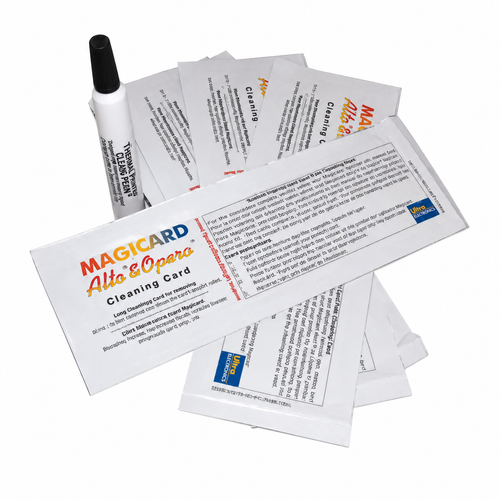
For routine maintenance, use the Magicard E9100 Pronto100 Cleaning Kit. The E9100 kit includes 10 cleaning cards and one printhead cleaning pen and is designed for maintaining the Pronto100 printer.
Magicard recommends cleaning the printer's rollers and printhead when changing the dye film to help maintain print quality and reduce contamination inside the printer.
Full-Color ID Card Printing for the Magicard Pronto100
For Pronto100 users who need professional single-sided color credentials, the Magicard MD100YMCKO/2 YMCKO ribbon provides the color panels, resin black printing and protective overlay required to produce up to 100 finished ID cards per ribbon. Its printer-specific design makes it the right consumable for reliable full-color printing with the Magicard Pronto100.

While we strive to provide accurate imagery, product photos may not reflect the exact model or configuration offered. Please refer to the product description and part number for details, or contact us for assistance before ordering.